Hover Updates
Get a Sneak Peek at Hover’s New Control Panel

Sign into your Hover account today and you’ll have the option to preview a brand new Control Panel to manage your Hover domains and services. We’re launching in a preview mode so early adopters and curious types can start poking around.
You should see a notification bar at the very top that gives you a way to switch to the new Control Panel. Don’t worry though, you can easily switch back. In fact, every time you sign in, we’ll continue to start you in the current Hover dashboard.
This big update has been in the works for quite some time, and we’re finally ready to let all of our customers take a look and start using it if they want. Thanks to those who have been helping us out with user testing and feedback over the last little bit.
All new, but still familiar
The release of a completely new Control Panel is a bit of a scary proposition for us and also probably for you. Over the years, we’ve all gotten used to how to do certain things in Hover, and now we’re making some pretty significant changes.
In designing and building the new Control Panel, we spent a great deal of time making sure that it would still feel fairly familiar if you’ve been a customer for a while. We’ve stuck with many similar patterns within the management tools, and the navigation is very much like the old panel.
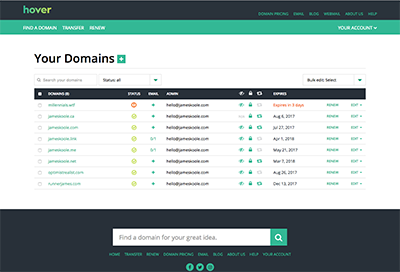 There’s a lot that’s brand new. We built this from scratch alongside the existing site so it’s completely new code. With many years more experience under our belts, and armed with lots of advice and feature requests from our customers, we’ve cleaned up and improved a ton of things to make managing your domain names and services even easier.
It’s also true that the way customers manage domains has changed. Gone are the days where all you needed to provide was a few details about the domain name and a way to view and edit some DNS records.
We have automatic setup of domains with Hover Connect, more forwarding options to get your domain pointed at your social media profiles. ICANN rules around trades and verifications are better integrated and we do a far better job making sure you are well-informed about the status of your domain names.
Some highlights:
- The domain list which shows all the domains in your Hover account now has more information (assuming you have more than one domain). You can see at a glance which domains have mailboxes configured, and even who the admin contact is for each domain. The familiar status icons remain so you’ll be able to quickly see any domains that need attention. And no matter how many domains you have, we show them all to you in a single, scrolling list with lots of sorting and filtering options. By default, we sort alphabetically, but domains that are expired, expiring soon, renewing soon or that need verification are brought to the top of the list so they don’t get lost in a long list.
- Each domain also now has what we’re calling a “domain dashboard” — a single page with all the relevant information for that domain. We’ve brought a Hover Connect “module” to the domain dashboard so when you have a new domain, getting it working with your favourite service is quicker and easier than ever. If you buy your domain via one of our partners, then you’ll get specific instructions relevant to setting up your domain with that partner’s service right there.
- We also have new domain dashboard modules for email, and forwards, so you can see exactly what you are doing with your domain at a glance. Tasks like editing a domain’s contacts, or updating name servers have been given a complete refresh to make those tasks much quicker and easier to accomplish.
- You’ll also note we’ve switched to doing most edits in popup windows (called “modals”). This allows you to do edits on things like your domain contacts, name servers and even mailboxes from more places throughout the Control Panel. So if you want to edit a mailbox from the domain dashboard module for email, that works the same as if you do it from the email tab for that domain.
Lots more to come!
We’re still working on a few things, but we think the new Control Panel is ready for most of our users to start trying it out. There are a few rough edges here and there, and some areas of your account aren’t yet done (like account settings, for example), but we’ve been using it internally over the last few months as we built it out and we think its more than ready for everyone.
We’d love to hear what you think. Let us know what works for you, and also what doesn’t work. You’ll see a link to a feedback form at the top of the new Control Panel.
p.s. For those who are less excited by change, we get it! The current Hover dashboard will remain in place for the next few months so you can ease your way in at your own pace.